
Enterprise websites are fundamentally different from conventional business websites. A standard corporate website may primarily present information about a company, its services, products, locations, and contact options. An enterprise website, by contrast, often becomes a critical digital platform connected to multiple business systems, internal teams, customer journeys, markets, and operational processes.
A large enterprise website may need to serve millions of requests, manage thousands of pages, support multiple languages and regions, integrate with CRM and ERP platforms, provide different permissions to different teams, and remain available during major traffic spikes. It may also need to support marketing teams, sales teams, customer service teams, IT administrators, external partners, and customers simultaneously.
This is why enterprise website development should begin with architecture and business requirements rather than immediately starting with visual design or coding. The technology decisions made at the beginning influence performance, security, scalability, SEO, maintenance costs, integration capabilities, and the organization’s ability to introduce new features later.
A well-designed enterprise digital platform should therefore be viewed as a long-term digital infrastructure investment rather than simply a larger version of a business website.
What Is Enterprise Website Development?
Enterprise website development is the process of designing, engineering, integrating, securing, deploying, and maintaining large-scale websites or digital platforms that need to support complex business requirements, high traffic, multiple users, sophisticated content operations, and integration with enterprise systems.
The word “enterprise” does not simply mean that a company is large. A smaller organization can also require enterprise-grade architecture if its website performs mission-critical functions or needs complex integrations.
For example, a company may require:
- CRM integration
- ERP connectivity
- centralized authentication
- multiple regional websites
- multilingual content
- complex product catalogues
- customer portals
- advanced search
- marketing automation
- real-time APIs
- role-based administration
- high availability
Once these requirements become central to the enterprise digital platform, conventional website development approaches may no longer be sufficient.
Enterprise development therefore combines several disciplines:
Business Analysis + UX + Software Architecture + Web Development + Security + DevOps + SEO + Data + Integrations
The objective is to create a platform that can continue operating reliably as traffic, content, users, integrations, and business requirements increase.
Enterprise Website vs Standard Business Website
One of the easiest ways to understand enterprise development is to compare it with conventional website development.
| Area | Standard Business Website | Enterprise Website |
| Architecture | Relatively simple | Modular or distributed |
| Traffic | Low to moderate | High or unpredictable |
| CMS | Basic content management | Advanced enterprise CMS or headless architecture |
| Users | Small internal team | Multiple teams and departments |
| Permissions | Basic administrator roles | Granular role-based access |
| Integrations | Few | CRM, ERP, PIM, DAM, APIs and other systems |
| Content | Limited | Large and continuously changing |
| Languages | Usually one | Multiple languages/regions |
| Search | Basic website search | Advanced enterprise search |
| Security | Standard controls | Multi-layer enterprise security |
| Deployment | Simple | Controlled CI/CD pipelines |
| Monitoring | Basic | Application, infrastructure and security monitoring |
| Scalability | Limited requirements | Designed for horizontal growth |
| Availability | Normal business requirements | High-availability requirements |
| Governance | Small team | Formal approval and governance processes |
| Maintenance | Occasional | Continuous engineering and monitoring |
The difference becomes particularly important when the website is connected to other business systems. A five-page corporate website can potentially operate independently. An enterprise platform might receive product information from a PIM, customer information from a CRM, employee authentication from an identity provider, pricing information from an ERP, and analytics data from several marketing platforms. In such an environment, the website becomes one component within a much larger technology ecosystem.
Why Enterprise Website Architecture Matters
Architecture determines how different components of the platform communicate and how the system behaves as complexity increases. A poorly designed scalable enterprise website may work perfectly during the first few months but become increasingly difficult to maintain as traffic, content, integrations, and development teams grow.
For example, an application that initially has five developers and 100 pages may later have:
- 50 developers
- thousands of pages
- multiple CMS environments
- dozens of integrations
- millions of monthly visitors
- multiple deployment environments
If the original architecture was not designed for this level of complexity, development velocity can decrease dramatically. Enterprise software architecture therefore needs to consider not only today’s requirements but also the organization’s expected growth.
Enterprise Software Architecture
Enterprise software architecture describes how the major components of an enterprise digital platform are organized, how they communicate, where business logic resides, how data moves between systems, and how the platform can be scaled and maintained. There is no single architecture that is correct for every enterprise.
Common architectural approaches include:
- Monolithic architecture
- Modular monolith
- Microservices architecture
- Headless architecture
- API-first architecture
- Event-driven architecture
- Hybrid architecture
The correct approach depends on the organization’s requirements rather than the popularity of a particular technology.
Monolithic Architecture
In a monolithic architecture, the primary application functionality is contained within a single application.
This can be effective when:
- the system is relatively straightforward
- the development team is small
- deployment requirements are simple
- integrations are limited
- the business does not require independent scaling of components
A well-engineered monolith can be easier to develop, test, deploy, and operate than an unnecessarily complex distributed system. The common misconception is that monolithic architecture is automatically unsuitable for enterprise application development. That isn’t necessarily true. The problem arises when a monolithic application becomes tightly coupled and difficult to modify.
Modular Monolith Architecture
A modular monolith provides a middle ground. The application remains deployable as a single system, but its internal components are separated into well-defined modules.
For example:
Enterprise Web Application
│
├── Customer Module
├── Product Module
├── Content Module
├── Authentication Module
├── Search Module
├── Order Module
└── Reporting Module
Each module has clear responsibilities and interfaces. This approach can provide many benefits of organized architecture without immediately introducing the operational complexity associated with microservices. For organizations that need a scalable foundation but don’t have a strong reason to distribute every component, a modular architecture can be a practical solution.
Microservices Architecture
Microservices divide an application into independently deployable services.
For example:
Enterprise Platform
│
┌────────────────┼────────────────┐
↓ ↓ ↓
Customer API Product API Content API
│ │ │
↓ ↓ ↓
CRM PIM CMS
Each service can potentially be developed, deployed, scaled, and maintained independently.
This can be useful when:
- different components have different scaling requirements
- multiple engineering teams work independently
- deployment independence is important
- systems have complex domain boundaries
- certain services need different technologies
However, microservices introduce additional complexity.
Organizations must manage:
- service communication
- distributed monitoring
- authentication
- service discovery
- deployment pipelines
- network failures
- data consistency
- logging
Therefore, adopting microservices simply because they sound more “enterprise” can create unnecessary operational overhead.
Monolith vs Modular Monolith vs Microservices
| Architecture | Best Suited For | Main Advantage | Main Challenge |
| Monolith | Simpler applications | Easier development and deployment | Can become tightly coupled |
| Modular Monolith | Growing applications | Structure without excessive operational complexity | Requires disciplined architecture |
| Microservices | Complex distributed systems | Independent deployment and scaling | Higher operational complexity |
The right architecture should be selected according to actual requirements. A mature enterprise software development team should be able to explain not only why a particular architecture is recommended but also why alternative approaches were rejected. That is a much stronger indicator of architectural expertise than simply promoting microservices, serverless, or any particular technology.
Headless Architecture for Enterprise Websites
Headless architecture separates the content management layer from the presentation layer.
Traditional CMS architecture often combines: Content Management + Presentation + Website Rendering
A headless architecture separates these components.
Headless CMS
│
┌────────────┼────────────┐
↓ ↓ ↓
Website Mobile App Portal
│ │ │
└────────────┼────────────┘
↓
APIs
The CMS manages content while different digital experiences consume that content through APIs. This can be particularly valuable for organizations operating multiple digital channels.
For example, the same product or corporate content might need to appear on:
- corporate websites
- regional websites
- mobile applications
- customer portals
- digital kiosks
- partner platforms
Headless architecture can make this multi-channel strategy easier to manage. However, it also introduces additional development and operational requirements, so it should be adopted when the business genuinely benefits from content decoupling.
API-First Enterprise Architecture
API-first architecture treats APIs as foundational interfaces between systems rather than creating integrations as afterthoughts.
This is particularly useful when the enterprise website needs to communicate with:
- CRM
- ERP
- PIM
- DAM
- payment platforms
- customer portals
- marketing systems
- identity providers
- third-party applications
For example:
CRM ────────┐
ERP ────────┤
PIM ────────┤
DAM ────────┼──→ API Layer ──→ Enterprise Website
SSO ────────┤
Analytics ──┘
An API-first strategy can reduce direct dependencies between systems and provide a clearer integration model. It also makes it easier to introduce additional digital experiences in the future.
Event-Driven Architecture
Some enterprise systems need different components to respond to events rather than constantly requesting information from each other.
For example:
Order Created
↓
Inventory Updated
↓
CRM Updated
↓
Email Triggered
↓
Analytics Event Recorded
An event-driven architecture can be useful for highly integrated enterprise systems where multiple services need to react to business events.
However, this architecture also introduces additional considerations around:
- event ordering
- retries
- duplicate events
- monitoring
- failure handling
- eventual consistency
It should therefore be used when the business requirements justify its complexity.
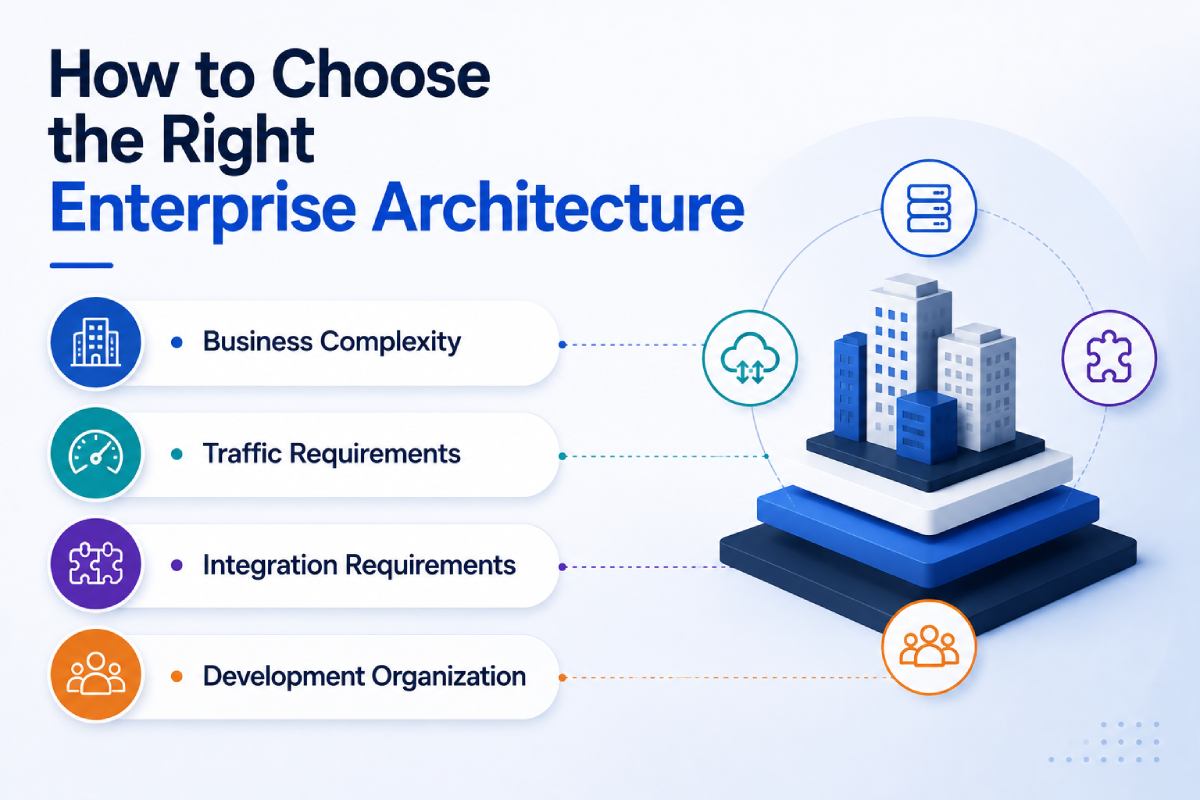
How to Choose the Right Enterprise Architecture
There is no universally “best” enterprise architecture. The correct approach depends on several variables.
Business Complexity
How many business processes need to be supported?
Traffic Requirements
How much traffic does the website receive today, and what growth is expected?
Integration Requirements
How many external systems need to communicate with the platform?
Development Organization
How many engineering teams will maintain the system?
Deployment Requirements
Do different components need to be deployed independently?
Security Requirements
Does the platform handle sensitive customer or business information?
Geographic Requirements
Does the organization operate multiple countries, regions, currencies, or languages?
Future Roadmap
Will the platform eventually become a customer portal, ecommerce system, application platform, or digital ecosystem?
These factors should drive architecture decisions.
Scalable Web Architecture: Designing for Growth
Scalable web architecture allows a website or digital platform to handle increasing traffic, users, data, and functionality without requiring a complete architectural redesign. Scalability should be considered from the beginning because retrofitting a system after it reaches its limits can be significantly more difficult. A scalable enterprise website commonly uses several architectural layers.
Users
↓
CDN / Edge
↓
Load Balancer
↓
Web / Application Layer
↓
Caching Layer
↓
API / Services
↓
Database
↓
External Enterprise Systems
Each layer can be optimized and, where appropriate, scaled independently.
Horizontal Scaling
Horizontal scaling means adding additional application instances rather than continuously increasing the resources of one server.
For example:
Load Balancer
/ | \
/ | \
Server 1 Server 2 Server 3
If traffic increases, additional instances can be introduced. This approach can improve resilience and capacity when the application architecture supports stateless or appropriately distributed workloads.
Vertical Scaling
Vertical scaling means increasing the resources available to an existing server.
For example:
- more CPU
- more RAM
- faster storage
It can be straightforward and useful for certain workloads, but it has physical and cost limitations. Enterprise architectures often combine vertical and horizontal scaling depending on the component.
Load Balancing
Load balancing distributes incoming traffic across multiple application servers.
Instead of: Users → One Server
the architecture becomes: Users → Load Balancer → Multiple Servers
This can improve:
- capacity
- availability
- fault tolerance
- traffic distribution
If one application instance becomes unavailable, the load balancer can route traffic to healthy instances depending on the configuration.
Caching Architecture
Caching reduces the amount of repeated processing required by the application. Instead of retrieving the same data repeatedly from the database, frequently requested information can be served from a faster cache.
Common caching layers include:
- browser caching
- CDN caching
- application caching
- database caching
For enterprise websites with large amounts of relatively stable content, effective caching can significantly improve response times and reduce infrastructure load. Caching strategies should nevertheless account for content freshness and invalidation requirements.
Content Delivery Network
A CDN distributes static and cacheable content through geographically distributed edge locations.
Without a CDN: Mumbai User → Origin Server
With a CDN: Mumbai User → Nearby Edge → Origin Server when required
This can reduce latency for users located far from the origin infrastructure.
CDNs are particularly useful for:
- images
- JavaScript
- CSS
- video
- downloadable files
- cacheable web pages
For global enterprises, CDN architecture can become an important component of performance strategy.
Database Scalability
As enterprise applications grow, the database can become a major performance bottleneck. Database scalability involves more than simply upgrading server resources.
It may require:
- proper indexing
- query optimization
- connection management
- caching
- read replicas
- partitioning
- database architecture changes
For example, read-heavy applications may benefit from separating read workloads from write workloads using appropriate replication strategies. Database design should therefore be considered as part of the broader enterprise software architecture, not treated as an isolated implementation detail.
Enterprise Website Performance Architecture
Performance should be designed into the platform rather than measured only after development is complete. An enterprise website may have thousands or millions of users, large amounts of content, complex APIs, and multiple third-party integrations. Poor performance at this scale can affect customer experience, search visibility, conversions, and infrastructure costs simultaneously.
A comprehensive performance strategy may include:
- CDN delivery
- server-side rendering
- static generation where appropriate
- caching
- image optimization
- lazy loading
- code splitting
- API optimization
- database optimization
- efficient third-party integrations
- performance monitoring
Server-Side Rendering
Server-side rendering generates HTML on the server before delivering it to the browser. This can improve initial content delivery and can be particularly useful for content-heavy websites where search engine accessibility and fast initial rendering are important.
Frameworks such as Next.js provide multiple rendering strategies, allowing different pages to use approaches appropriate to their content and performance requirements. The correct rendering approach should be selected on a page or application basis rather than assuming every page requires the same model.
Static Generation
Pages whose content changes infrequently can sometimes be generated ahead of time. This reduces the amount of processing required for every request.
Examples might include:
- corporate information
- evergreen service pages
- documentation
- selected marketing pages
Static generation can be combined with dynamic rendering for other areas. This hybrid approach is often useful for enterprise websites with both highly stable and highly dynamic content.
Image and Media Optimization
Large media files can significantly affect page performance.
Enterprise websites frequently contain:
- product photography
- campaign images
- videos
- downloadable documents
- technical diagrams
Optimization can include:
- appropriate image formats
- responsive images
- compression
- lazy loading
- CDN delivery
- appropriate image dimensions
The objective isn’t simply to reduce file size. It is to deliver the appropriate media quality for the user’s device and context.
JavaScript and Code Optimization
Large JavaScript bundles can delay page interactivity.
Enterprise websites should therefore consider:
- code splitting
- lazy loading
- removing unused dependencies
- minimizing client-side JavaScript
- efficient third-party scripts
This becomes particularly important when websites contain analytics platforms, chat tools, advertising scripts, personalization engines, and other third-party services. Every additional script can introduce processing, network, and performance costs.
API Performance
Enterprise websites frequently depend on APIs for:
- product information
- customer data
- search
- pricing
- inventory
- authentication
- personalization
Slow APIs can make the entire website appear slow even when the frontend itself is well optimized.
API performance should therefore be evaluated through:
- response time
- payload size
- caching
- database queries
- connection management
- rate limits
- failure handling
Performance monitoring should identify whether delays originate from the browser, application, API, database, or third-party system.
Performance and Business Outcomes
Enterprise performance is not simply a technical KPI.
It can influence:
Page Speed
↓
User Experience
↓
Engagement
↓
Conversion
↓
Revenue
It can also influence SEO because search engines consider page experience and technical performance as part of their broader evaluation of websites. For large enterprises investing heavily in organic search, paid advertising, and digital campaigns, performance problems can therefore multiply marketing inefficiencies.
Enterprise Performance Requires Continuous Monitoring
A website can perform well during development and still become slow after launch.
- Traffic increases
- Content grows
- New integrations are added
- Marketing scripts accumulate
- Databases expand
- Third-party services change
These factors can gradually degrade performance. Enterprise platforms therefore need ongoing monitoring rather than a one-time performance audit.
Useful monitoring areas include:
- page response time
- Core Web Vitals
- API latency
- server resource usage
- database performance
- error rates
- uptime
- traffic patterns
The goal is to identify performance degradation before it becomes a major customer or business problem.
Key Takeaways
Enterprise website development is fundamentally an architecture and engineering challenge, not simply a larger website design project.
A robust scalable enterprise website should be designed around:
- business requirements
- scalability
- performance
- security
- integrations
- maintainability
- SEO
- governance
- future growth
There is no universally correct architecture. A monolith may be appropriate for one organization, while a modular monolith, headless architecture, microservices, or event-driven approach may make sense for another. The strongest architecture is the one that solves the organization’s actual problems without introducing unnecessary complexity. Most importantly, architecture should be designed before development becomes deeply committed to a particular technology or implementation approach.
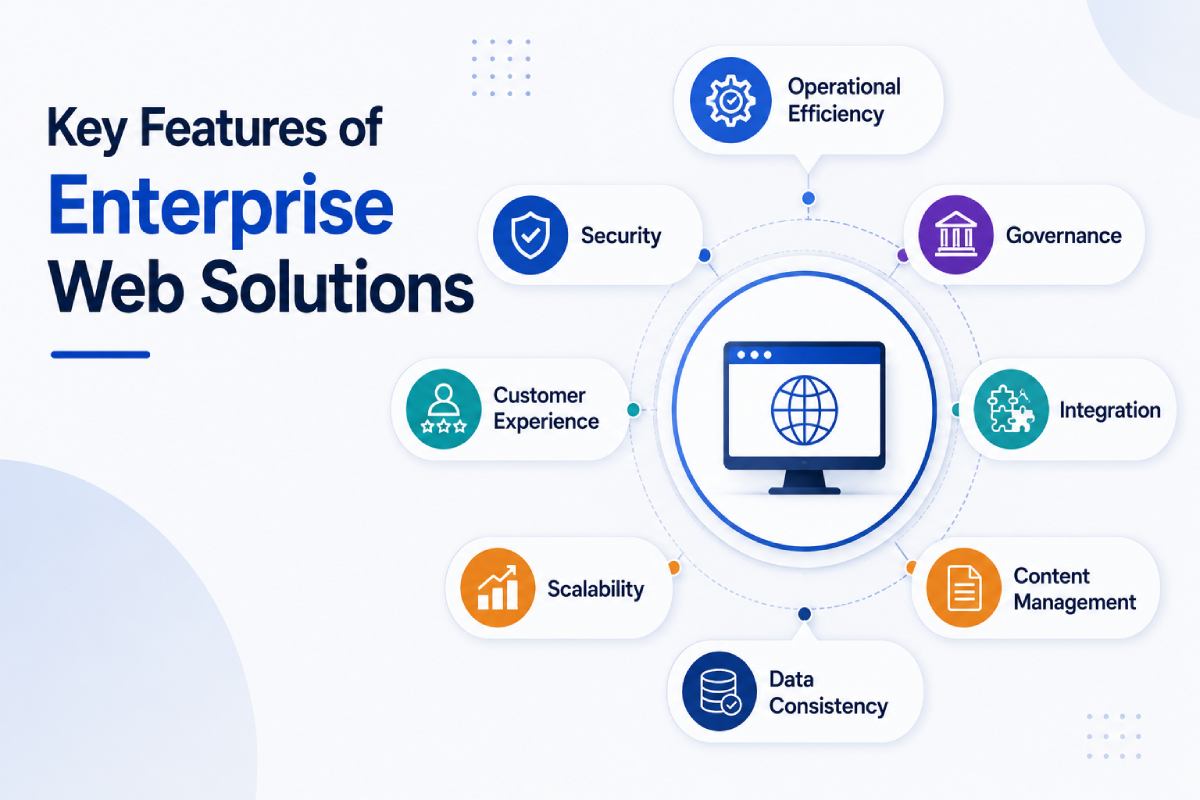
Key Features of Enterprise Web Solutions
A modern enterprise web solution should be designed around the organization’s operational requirements rather than simply increasing the number of pages or adding more visual features.
The features that matter most are usually those that improve:
- operational efficiency
- governance
- security
- customer experience
- integration
- scalability
- content management
- data consistency
An enterprise platform may therefore combine a CMS, APIs, authentication, search, personalization, analytics, CRM integrations, ERP connectivity, and customer-facing applications within one broader architecture.
Advanced Enterprise CMS
A conventional CMS may be sufficient when a small marketing team manages a limited number of pages. Enterprise organizations often have hundreds or thousands of content items managed by different departments, regions, brands, or business units. An enterprise CMS needs to provide stronger governance and organizational control.
Important capabilities can include:
- structured content
- reusable content components
- role-based permissions
- content workflows
- version history
- approval processes
- localization
- scheduled publishing
- media management
- content APIs
The CMS should also support the organization’s future content strategy rather than simply solving today’s publishing requirements.
Structured Content
Enterprise web solutions often need to support multiple business functions simultaneously.
For example, a product may contain:
- product name
- description
- specifications
- images
- documents
- certifications
- related products
Rather than storing this information as unstructured page content, a structured content model allows individual fields to be managed independently. This improves consistency and makes the same information easier to distribute across websites, applications, portals, and other digital channels.
Headless CMS for Enterprise Organizations
A headless CMS separates content management from presentation. This allows an organization to maintain content centrally while delivering it to multiple experiences.
For example:
Enterprise CMS
│
┌───────────┼───────────┐
↓ ↓ ↓
Website Mobile App Portal
│ │ │
└───────────┼───────────┘
↓
APIs
This architecture can be valuable for organizations operating multiple digital channels. However, headless CMS adoption should be based on actual business requirements. It can introduce additional development and content-preview complexity compared with a conventional CMS.
The question should therefore not be: “Is headless better?”
It should be: “Does our organization benefit from separating content management from presentation?”
Multi-User Roles and Permissions
Enterprise websites are rarely managed by a single administrator. Different users may need different access levels.
For example:
| Role | Possible Access |
| Content Author | Create and edit content |
| Editor | Review and modify content |
| Marketing Manager | Approve campaigns |
| Regional Manager | Manage regional content |
| Product Manager | Manage product information |
| Administrator | System configuration |
| Developer | Technical configuration |
| Auditor | Read-only access |
This is where role-based access control (RBAC) becomes important. Users should receive only the permissions required to perform their responsibilities. This follows the principle of least privilege and reduces the risk of accidental or unauthorized changes.
Content Approval Workflows
Enterprise organizations often cannot allow every published change to go directly to production.
A typical workflow might be:
Author
↓
Editor
↓
Legal / Compliance
↓
Marketing Manager
↓
Publish
This is particularly important for industries where content requires regulatory or legal review.
Workflow systems should support:
- draft states
- review
- comments
- revisions
- approval
- rejection
- scheduled publishing
- audit history
A structured workflow allows large organizations to maintain control without preventing marketing teams from operating efficiently.
Multi-Language and Multi-Region Websites
Global organizations often need to manage websites across:
- countries
- languages
- currencies
- legal environments
- product portfolios
- regional teams
A multinational organization may have:
Global Website
│
├── India
├── UAE
├── UK
├── USA
├── Germany
└── Singapore
Each region may share a common brand identity while having different content, products, contact details, legal requirements, and customer journeys. Enterprise architecture should therefore determine which elements are globally controlled and which can be managed locally.
Global Content Governance
A strong multi-region model typically separates:
Global Components
- brand guidelines
- core navigation
- design system
- corporate information
- global policies
Local Components
- regional services
- contact information
- local campaigns
- pricing
- regional legal content
- local products
Without governance, regional websites can gradually become inconsistent. A centralized architecture combined with controlled local flexibility provides a better balance.
International SEO Considerations
Multi-region enterprise websites also require careful SEO architecture.
Common requirements include:
- country-specific URLs
- language-specific URLs
- hreflang
- canonical tags
- localized metadata
- XML sitemaps
- regional structured data
- internal linking
For example:
- example.com/in/
- example.com/uk/
- example.com/us/
- example.com/de/
The architecture should clearly communicate the relationship between localized versions to both users and search engines. International SEO should therefore be considered during architecture planning, not added after the website has already been launched.
Enterprise Search
As websites become larger, navigation alone becomes insufficient.
An enterprise website may contain thousands or even millions of:
- products
- documents
- articles
- support pages
- technical resources
- locations
Users need to be able to find the correct information quickly.
An enterprise search system may support:
- full-text search
- filters
- facets
- autocomplete
- typo tolerance
- synonyms
- relevance ranking
- product filtering
- document search
Search should also understand the organization’s content structure.
For example, a user searching for a technical product may need to filter by:
- category
- application
- specification
- industry
- region
- availability
This creates a substantially better experience than a basic keyword search box.
Enterprise Search Architecture
A typical architecture may look like:
Content Sources
│
├── CMS
├── PIM
├── Documents
└── Product Database
│
↓
Search Index
│
↓
Search API
│
↓
Website / Portal
This approach allows search indexes to be optimized separately from the underlying content systems. It also makes it easier to introduce advanced relevance rules and filtering.
Personalization
Enterprise organizations increasingly want websites to provide more relevant experiences to different users.
Personalization can be based on factors such as:
- geographic region
- industry
- customer type
- previous interactions
- logged-in status
- product interests
- lifecycle stage
For example, a returning customer may see different recommendations from a first-time visitor. However, personalization should be implemented carefully. Poorly designed personalization can increase system complexity, create privacy concerns, and make SEO or caching more difficult. The business benefit should justify the technical complexity.
Customer and Partner Portals
Some enterprises require authenticated areas in addition to their public website.
Examples include:
- customer portals
- distributor portals
- supplier portals
- dealer portals
- partner platforms
A customer portal might allow users to:
- view orders
- download invoices
- submit support requests
- access documents
- manage profiles
- track service requests
A distributor portal may provide:
- product information
- pricing
- sales materials
- inventory information
- order management
These capabilities often require deeper integration with CRM, ERP, identity, and business systems, making enterprise web solutions essential for connected customer and partner experiences.
CRM Integration
A website can become a major source of customer and lead data.
CRM integration allows website interactions to flow into systems such as:
- Salesforce
- Microsoft Dynamics
- HubSpot
- Other enterprise CRM platforms
For example:
Website Form
↓
Validation
↓
API
↓
CRM
↓
Lead Assignment
↓
Sales Team
The integration should define what information is transferred, how duplicates are handled, what happens when the CRM is unavailable, and how data is secured. Simply connecting a form to a CRM is not enough for enterprise environments.
ERP Integration
Enterprise websites may also need to communicate with ERP systems.
Depending on the business, the website may retrieve:
- product information
- inventory
- pricing
- order status
- customer information
For example, an e-commerce or B2B ordering platform could use ERP data to determine whether a product is available. ERP integrations require careful architecture because the ERP may be a mission-critical system that should not be exposed directly to public traffic. A secure integration layer or API architecture should typically separate the public website from internal enterprise systems.
PIM Integration
A Product Information Management system can act as the central source of product information. This is particularly useful for organizations with large product catalogues.
A PIM may contain:
- product names
- descriptions
- specifications
- technical attributes
- images
- documents
- certifications
- regional information
The enterprise website can consume approved product information from the PIM rather than requiring marketing teams to manually maintain duplicate product data. This improves consistency across channels.
DAM Integration
Digital Asset Management systems help organizations manage large libraries of:
- photographs
- videos
- brochures
- logos
- technical documents
- campaign assets
Integrating the DAM with the website allows teams to manage approved assets centrally. This can improve governance and reduce the risk of outdated or incorrect brand materials appearing on regional websites.
Enterprise API Architecture
APIs are the communication layer connecting many components of an enterprise digital ecosystem.
A mature enterprise platform may have APIs connecting:
CRM
│
ERP ──────┐
│ │
PIM ──── ──┼──→ API Layer → Website
│ │
DAM ──────┘
│
Analytics
The API layer should be designed with security, versioning, performance, documentation, and monitoring in mind.
REST APIs
REST remains widely used for enterprise integrations because it is relatively straightforward, widely supported, and compatible with many technology stacks.
REST API design should consider:
- resource structure
- authentication
- HTTP methods
- response formats
- error handling
- versioning
- rate limits
Poor API design can create long-term integration problems, so API standards should be defined early.
GraphQL
GraphQL allows clients to request the specific data they require rather than receiving a fixed response structure.
This can be useful when:
- different frontend applications need different data
- content models are complex
- reducing unnecessary payloads is important
However, GraphQL also introduces considerations around:
- query complexity
- caching
- authorization
- monitoring
- abuse prevention
It should be adopted where its advantages justify the additional complexity.
API Gateway
An API gateway can provide a controlled entry point between clients and backend services.
It can handle functions such as:
- authentication
- authorization
- rate limiting
- routing
- logging
- monitoring
- request transformation
A gateway can also prevent public-facing applications from communicating directly with internal enterprise services. This provides an additional architectural control layer.
API Authentication and Authorization
Enterprise APIs should never rely solely on obscurity or basic authentication mechanisms.
Depending on the use case, organizations may use:
- OAuth 2.0
- OpenID Connect
- API keys
- signed tokens
- service-to-service authentication
Authentication answers:
- Who are you?
- Authorization answers:
- What are you allowed to access?
These should be designed separately.
API Versioning
Enterprise integrations can remain operational for years. Changing an API without considering existing consumers can break applications, websites, and internal systems. Versioning strategies may therefore be required.
For example:
- /api/v1/products
- /api/v2/products
The exact strategy depends on the organization’s API governance model. The important principle is that enterprise APIs should evolve in a controlled and documented manner.
Enterprise Security Architecture
Security needs to be embedded throughout the platform rather than added immediately before launch.
An enterprise security architecture can include multiple layers:
User
↓
CDN / WAF
↓
Application
↓
API Layer
↓
Services
↓
Database
↓
Enterprise Systems
Each layer should have appropriate controls.
Security considerations include:
- authentication
- authorization
- encryption
- network security
- secure coding
- vulnerability management
- logging
- monitoring
- backups
- disaster recovery
Authentication
Enterprise platforms may need to support several authentication scenarios.
Public users may access:
- website content
- product information
- contact forms
Authenticated users may access:
- customer portals
- partner areas
- employee systems
The authentication architecture should clearly separate public and protected resources.
Role-Based Access Control
RBAC determines what authenticated users can do based on their assigned roles.
For example:
Administrator
↓
Full System Access
Content Manager
↓
Content Management
Regional Manager
↓
Regional Content
Customer
↓
Own Account / Orders
This reduces excessive permissions and simplifies access management.
For enterprise environments, permissions may need to consider not only role but also:
- department
- region
- organization
- resource ownership
Single Sign-On
Enterprise users frequently expect to authenticate through their organization’s existing identity platform instead of maintaining separate usernames and passwords. Single Sign-On allows users to authenticate centrally and then access authorized applications.
This improves:
- user experience
- centralized access control
- password management
- employee onboarding/offboarding
- security governance
OAuth 2.0 and OpenID Connect
OAuth 2.0 is commonly used for delegated authorization, while OpenID Connect builds an authentication identity layer on top of OAuth 2.0. This distinction is important in enterprise architecture.
- OAuth 2.0 answers primarily: “Can this application access this resource?”
- OpenID Connect additionally provides a standardized mechanism for: “Who is the authenticated user?”
Enterprise platforms should select the appropriate flow based on the application type and security requirements.
Microsoft Entra ID Integration
Organizations using Microsoft’s identity ecosystem may use Microsoft Entra ID as their centralized identity provider.
An enterprise website or CMS can potentially integrate with Entra ID to support:
- Single Sign-On
- centralized authentication
- user identity
- role mapping
- access control
Common protocols include:
- OpenID Connect
- OAuth 2.0
The implementation should map enterprise identity and application permissions carefully.
For example:
Microsoft Entra ID
↓
Authentication
↓
Enterprise Website / CMS
↓
Application Roles
↓
Authorized Features
The website should not simply authenticate the user and assume they have unrestricted access.
Authentication and authorization must remain separate concerns.
Encryption
Sensitive data should be protected both during transmission and, where appropriate, at rest. HTTPS/TLS protects communication between browsers and servers.
Enterprise systems may additionally use encryption for:
- databases
- backups
- sensitive files
- API communication
- stored credentials
Encryption strategies should align with the organization’s security policies and regulatory requirements.
Web Application Firewall
A Web Application Firewall can help protect public-facing applications from malicious traffic and common application-layer attacks.
Depending on the implementation, a WAF can help identify or block suspicious patterns involving:
- SQL injection
- cross-site scripting
- malicious bots
- abnormal requests
A WAF is not a substitute for secure application development. It should be considered one layer within a broader security strategy.
Security Logging and Audit Trails
Enterprise systems often need to know:
- who changed something
- what was changed
- when it changed
- from where
- whether the action succeeded
Audit logs can be particularly important for:
- administrative changes
- user access
- content publication
- permission changes
- security events
- critical transactions
Logs should be protected against unauthorized modification and retained according to organizational requirements.
Enterprise SEO Architecture
Enterprise SEO becomes significantly more complex as websites grow.
A large organization may have:
- thousands of URLs
- multiple product categories
- regional websites
- multiple languages
- dynamic filters
- JavaScript applications
- duplicate content
- legacy URLs
Technical SEO therefore needs to be designed into the architecture.
Enterprise URL Architecture
URL structures should be:
- predictable
- logical
- scalable
- human-readable
- consistent
For example:
/products/
/industrial-equipment/
/product-name/
/services/
/consulting/
/technology-consulting/
Poor URL structures can create unnecessary crawl paths and make content relationships harder for users and search engines to understand.
Canonicalization
Large websites frequently generate duplicate or near-duplicate URLs.
This can happen through:
- filters
- parameters
- sorting
- tracking URLs
- alternate paths
Canonicalization helps communicate which URL represents the preferred version of a page. However, canonical tags should be implemented carefully and consistently with the actual website architecture.
Faceted Navigation
Large ecommerce and product websites often use filters such as:
- brand
- category
- size
- colour
- price
- specification
If every combination creates an indexable URL, the number of URLs can grow dramatically.
For example:
10 filters × multiple values = thousands or millions of potential URL combinations
Enterprise SEO architecture must determine which combinations should be:
- indexable
- canonicalized
- blocked from crawling
- internally linked
- optimized as landing pages
This requires collaboration between SEO specialists, developers, and product teams.
Enterprise Internal Linking
Internal linking becomes increasingly important as websites become larger.
A good architecture should establish relationships between:
- categories
- products
- services
- resources
- locations
- supporting content
Internal links help users navigate large websites and help search engines understand content hierarchy and relationships. For enterprise websites, internal linking should ideally be supported by the underlying information architecture rather than handled manually for every page.
Structured Data
Enterprise websites can use structured data to provide clearer machine-readable information about entities and content.
Depending on the business, relevant schema types may include:
- Organization
- Product
- Service
- Article
- Breadcrumb
- FAQ
- LocalBusiness
- Event
Structured data should represent information that is actually present and accurate on the page. It should not be used simply to add keywords or manipulate search results.
Enterprise SEO and AI Search
Enterprise websites increasingly need to consider not only traditional search results but also AI-powered discovery.
AI systems need to understand:
- what the company does
- which products it provides
- where it operates
- who its experts are
- which industries it serves
- how its products relate to broader topics
This makes clear entity architecture, authoritative content, structured information, and consistent brand data increasingly valuable. For enterprise organizations, SEO architecture and AI Search Optimization should therefore be considered complementary rather than completely separate disciplines.
Key Takeaways
Enterprise web solutions require much more than a powerful frontend.
A mature enterprise platform needs to connect:
- Content
- People
- Business Systems
- Identity
- Security
- Data
- Search
- Digital Experiences
The strongest implementations create clear boundaries between these systems while providing reliable APIs and controlled data flows between them. Enterprise architecture should also balance flexibility with governance. Too little structure creates security and maintenance problems, while excessive complexity can slow development and increase operating costs. The objective is not to build the most complicated system possible. It is to build the simplest architecture capable of reliably supporting the organization’s current and future requirements.
A mature enterprise system development process therefore needs to cover the entire lifecycle:
Discovery → Architecture → Design → Development → Integration → Testing → Deployment → Monitoring → Continuous Improvement
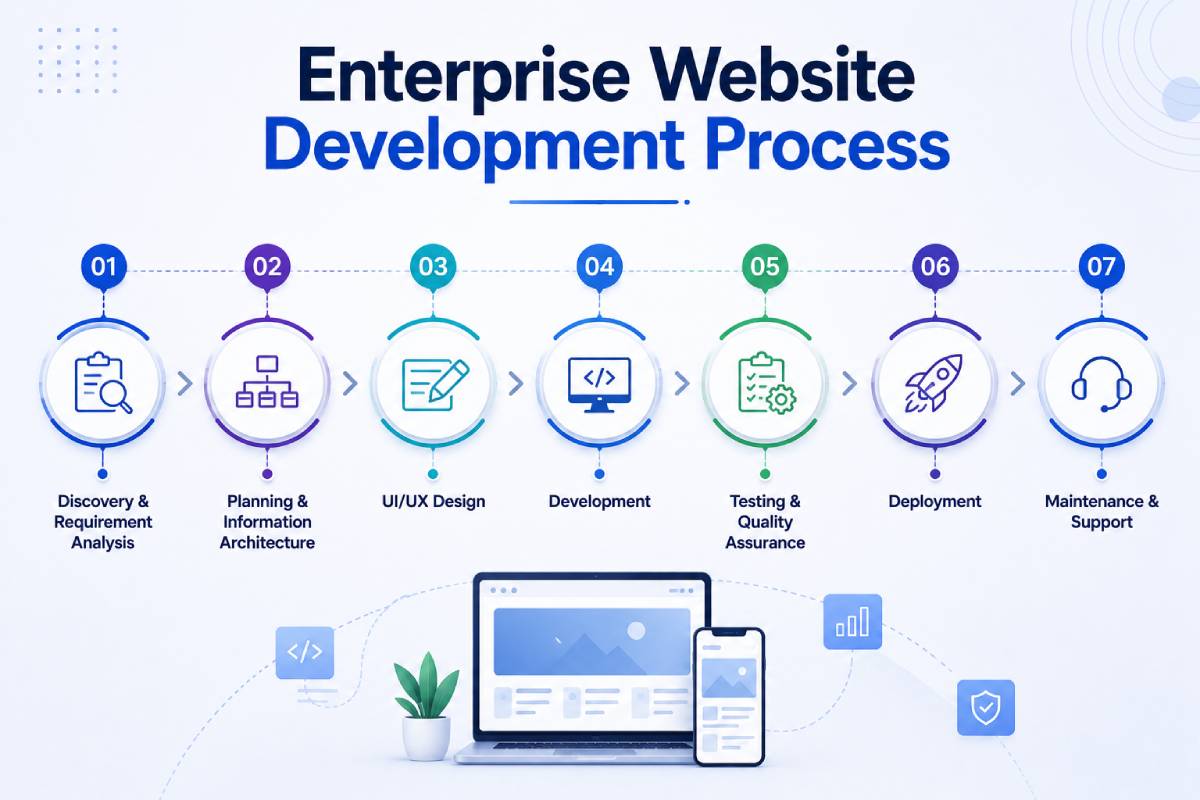
Enterprise Website Development Process
A structured enterprise software development process reduces technical risk and gives business and technology teams clear decision points throughout the project. Unlike smaller websites where design and development can happen relatively informally, enterprise projects require documented requirements, architecture decisions, security reviews, testing processes, deployment controls, and stakeholder approvals.
A typical enterprise development lifecycle looks like:
Business Discovery
↓
Requirements Definition
↓
Technical Architecture
↓
Information Architecture
↓
UX/UI Design
↓
Development
↓
System Integration
↓
Security Testing
↓
Quality Assurance
↓
Performance Testing
↓
User Acceptance Testing
↓
Deployment
↓
Monitoring
↓
Continuous Optimization
Each stage of a software development enterprise project should have clearly defined outputs and approval criteria before the project progresses.
Phase 1: Discovery and Business Requirements
Enterprise system development should begin with business discovery rather than technology selection.
The development team needs to understand:
- business objectives
- target users
- internal stakeholders
- existing systems
- operational workflows
- technical constraints
- security requirements
- geographic markets
- regulatory requirements
- future roadmap
For example, replacing a corporate website may appear straightforward until the team discovers that the existing platform integrates with six internal systems, contains thousands of product records, serves multiple countries, and has dozens of internal content administrators. These dependencies need to be identified before architecture decisions are finalized.
Requirements Documentation
A detailed requirements document should distinguish between:
Functional Requirements
What the system needs to do.
Examples:
- user registration
- product search
- customer portal
- quotation requests
- content workflows
- CRM integration
Non-Functional Requirements
How the system needs to perform.
Examples:
- response time
- availability
- security
- scalability
- accessibility
- recovery requirements
This distinction is important because an application can technically perform every requested function while still failing enterprise requirements around security, availability, or performance.
Phase 2: Technical Architecture
Once requirements are understood, architects define the technical foundation.
Architecture decisions may cover:
- frontend framework
- backend architecture
- CMS
- database
- API layer
- authentication
- cloud infrastructure
- CDN
- caching
- search
- monitoring
- third-party integrations
The architecture should document how these components interact.
For example:
Users
↓
CDN / WAF
↓
Load Balancer
↓
Web Application
↓
API Layer
┌───────────┼───────────┐
↓ ↓ ↓
CMS CRM PIM
│ │ │
└───────────┼───────────┘
↓
ERP / Data
The exact architecture should be based on business requirements rather than following a technology trend.
Phase 3: Information Architecture
Enterprise websites often contain enormous amounts of information. Information architecture determines how that information is organized.
It includes:
- navigation
- categories
- content hierarchy
- URL structures
- taxonomy
- content relationships
- search architecture
A well-designed information architecture helps three groups simultaneously:
- Users find information faster.
- Content teams manage information more efficiently.
- Search engines understand the website’s hierarchy.
For large enterprise websites, taxonomy decisions made during this phase can influence SEO and content management for years.
Phase 4: UX and UI Design
Enterprise UX design needs to accommodate multiple audiences and potentially thousands of journeys.
Design teams should consider:
- customer journeys
- employee workflows
- accessibility
- responsive behaviour
- search
- navigation
- forms
- conversion paths
- authenticated experiences
The design system should also establish reusable components.
For example:
Enterprise Design System
│
├── Buttons
├── Forms
├── Cards
├── Navigation
├── Tables
├── Alerts
├── Search
└── Content Components
A design system improves consistency and reduces development effort when hundreds of pages or multiple regional websites use the same components.
Phase 5: Development
Development typically happens across multiple environments.
A common setup includes: Development → Staging → Production
Developers work on features in controlled development environments before changes reach staging. The staging environment should replicate production conditions as closely as practical.
This provides a safer environment for:
- integration testing
- content testing
- security testing
- performance testing
- stakeholder approval
Enterprise projects should also maintain clear source-control and branching practices.
Phase 6: Enterprise System Integration
Integrations should be developed and tested independently rather than left until the final stages of the project.
Potential integrations include:
- CRM
- ERP
- PIM
- DAM
- payment systems
- identity providers
- analytics
- marketing automation
- customer support systems
Each integration should define:
- data ownership
- API contract
- authentication
- error handling
- retry behaviour
- monitoring
- data validation
A common enterprise failure is assuming that “API available” means “integration is easy.” Real integrations often involve data mapping, authentication, rate limits, legacy systems, inconsistent data, and failure scenarios.
Phase 7: Security Testing
Security testing should happen throughout development rather than only immediately before launch.
Testing may include:
- vulnerability scanning
- dependency analysis
- authentication testing
- authorization testing
- API security testing
- penetration testing
- input validation testing
- session management testing
The exact testing program should depend on the organization’s security requirements and risk profile. Security should also be reviewed whenever major architecture or integration changes are introduced.
Phase 8: Quality Assurance
Enterprise QA should validate both individual features and interactions between systems.
Testing can include:
Functional Testing
Does the feature work according to requirements?
Integration Testing
Do connected systems exchange information correctly?
Regression Testing
Did a new change break an existing feature?
Browser Testing
Does the website work across supported browsers?
Mobile Testing
Does the interface work across supported devices?
Accessibility Testing
Can users with different accessibility needs interact with the system?
API Testing
Do APIs return the expected responses and handle errors correctly?
A formal QA process reduces the risk of discovering critical issues after launch.
Performance Testing
Enterprise platforms should be tested under realistic traffic conditions.
Performance testing can evaluate:
- response times
- concurrent users
- API latency
- database performance
- server utilization
- throughput
- failure behaviour
Testing should not focus only on the homepage.
Important high-traffic journeys may include:
- product searches
- login
- customer portals
- checkout
- quotation requests
- document downloads
- API-heavy pages
The objective is to understand how the system behaves under expected and exceptional loads.
User Acceptance Testing
Technical testing does not replace business validation. User Acceptance Testing (UAT) allows business stakeholders to verify whether the platform actually supports their workflows. Different teams may test different areas.
For example:
- Marketing → Content publishing
- Sales → Lead management
- Customer Service → Customer portal
- Product Team → Product information
- Regional Teams → Localized content
UAT should have predefined acceptance criteria rather than becoming an open-ended review process.
Enterprise DevOps and CI/CD
Enterprise development requires controlled and repeatable deployments. A CI/CD pipeline can automate parts of the process from code submission through testing and deployment.
A simplified workflow can look like:
Developer Commit
↓
Automated Build
↓
Automated Tests
↓
Security Checks
↓
Staging Deployment
↓
Approval
↓
Production Deployment
This reduces manual deployment errors and provides a consistent release process.
Continuous Integration
Continuous Integration encourages developers to integrate code changes frequently. Automated checks can identify problems before they reach production.
These checks may include:
- unit tests
- integration tests
- linting
- dependency checks
- security scans
- build validation
The goal is to identify defects as early as possible.
Continuous Deployment
Depending on organizational requirements, approved builds may be deployed automatically or through controlled manual approvals. Enterprise organizations often require additional controls around production releases, particularly for business-critical systems.
These can include:
- change approvals
- release windows
- rollback plans
- audit logs
- deployment records
The exact process should match the organization’s governance requirements.
Monitoring Enterprise Websites
Launching an enterprise website does not end the engineering process.
Once the system is live, teams need to know:
- Is it available?
- Is it fast?
- Are APIs working?
- Are errors increasing?
- Are servers overloaded?
- Are users encountering failures?
Monitoring can operate at several levels.
Infrastructure Monitoring
- CPU
- memory
- storage
- network
Application Monitoring
- response time
- errors
- transactions
- exceptions
API Monitoring
- latency
- failures
- throughput
Website Monitoring
- uptime
- page performance
- Core Web Vitals
Security Monitoring
- suspicious traffic
- authentication failures
- vulnerabilities
Monitoring should provide actionable alerts rather than simply collecting large quantities of data.
Disaster Recovery and Business Continuity
Enterprise systems need a plan for what happens when something goes wrong.
Potential incidents include:
- server failure
- database corruption
- cloud outage
- cyberattack
- accidental deletion
- failed deployment
- third-party service failure
A disaster recovery strategy defines how the organization restores operations.
It should cover:
- backups
- redundancy
- recovery procedures
- failover
- communication
- restoration testing
Backups are valuable only if the organization can actually restore them. Recovery procedures should therefore be tested periodically.
RPO vs RTO
Two important disaster recovery concepts are RPO and RTO.
Recovery Point Objective (RPO)
RPO defines how much data loss the organization can tolerate.
For example: RPO = 15 minutes
means the organization aims to recover with no more than approximately 15 minutes of data loss.
Recovery Time Objective (RTO)
RTO defines how quickly the system should be restored after an incident.
For example: RTO = 1 hour
means the system should ideally be restored within approximately one hour. Different enterprise systems may have different RPO and RTO requirements. A public marketing website may have different requirements from a customer ordering platform or financial system.
Enterprise Website Development Cost in India
Enterprise website development cannot be priced accurately from page count alone. A ten-page enterprise website with complex integrations can be significantly more expensive than a 500-page informational website.
Pricing depends on:
- architecture
- technology
- integrations
- CMS
- security
- traffic requirements
- number of markets
- user roles
- custom functionality
- infrastructure
- testing
- ongoing support
As a broad planning framework:
| Enterprise Project Type | Approximate Investment |
| Enterprise Corporate Website | ₹10 Lakhs – ₹25 Lakhs+ |
| Complex Enterprise Website | ₹25 Lakhs – ₹50 Lakhs+ |
| Enterprise Web Application | ₹30 Lakhs – ₹1 Crore+ |
| Large Digital Ecosystem | ₹1 Crore+ |
These figures should not be treated as fixed market prices. A detailed technical discovery is required before providing a reliable estimate.
What Drives Enterprise Development Cost?
Architecture Complexity
A straightforward platform has different engineering requirements from a distributed system involving multiple services.
Number of Integrations
Every CRM, ERP, PIM, identity provider, or third-party system introduces additional development and testing requirements.
Security Requirements
Enterprise authentication, authorization, penetration testing, compliance controls, and monitoring can significantly affect project scope.
Number of Regions
Supporting multiple countries can require additional:
- languages
- currencies
- content
- workflows
- legal requirements
- SEO architecture
Custom Functionality
Customer portals, advanced search, personalization, workflow systems, and enterprise application development require specialized engineering.
Ongoing Support
Enterprise platforms require continuous:
- monitoring
- security updates
- performance optimization
- infrastructure management
- feature development
The initial development budget should therefore be considered alongside the expected cost of ownership.
Common Enterprise Website Development Mistakes
Even large organizations can make fundamental mistakes when implementing digital platforms.
1. Choosing Technology Before Requirements
- Selecting a framework first and trying to fit business requirements around it can create unnecessary limitations.
- Architecture should follow requirements.
2. Overengineering
- Not every enterprise project requires microservices, event-driven architecture, or multiple layers of abstraction.
- Complexity has a cost. The architecture should be as sophisticated as necessary but no more sophisticated than necessary.
3. Underestimating Integrations
- Enterprise software development often involves substantial integration and testing effort across legacy systems, APIs, authentication requirements, and business platforms.
- Legacy systems, inconsistent data, authentication requirements, and API limitations should be discovered during technical planning.
4. Treating Security as a Final Checklist
Security should influence enterprise software development, architecture, authentication, APIs, infrastructure, development practices, and testing from the beginning.
5. Ignoring SEO During Architecture
- Large-scale SEO problems can become difficult to fix after thousands of URLs have been indexed.
- URL architecture, rendering, canonicalization, internal linking, structured data, and internationalization should be planned early.
6. No Performance Testing
- A website that works for 20 internal testers may behave very differently under real traffic.
- Load and performance testing should happen before launch.
7. Poor Documentation
Enterprise systems often outlive individual developers.
Documentation should cover:
- architecture
- APIs
- deployments
- integrations
- environments
- configuration
- recovery procedures
Without documentation, organizations become dependent on specific individuals.
8. No Governance Model
Large organizations need clear ownership.
Someone should be responsible for:
- content
- security
- architecture
- releases
- integrations
- permissions
Without governance, enterprise platforms become difficult to manage.
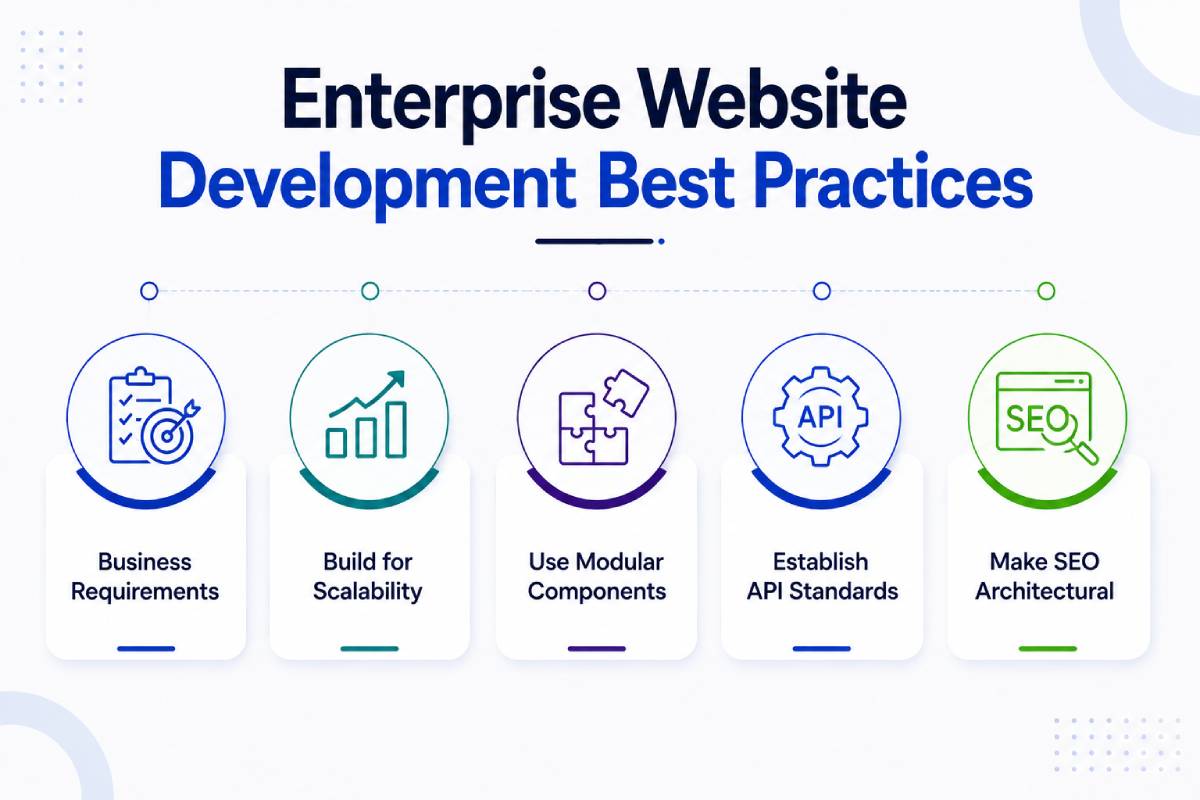
Enterprise Website Development Best Practices
A strong enterprise implementation should follow several principles.
1. Design Architecture Around Business Requirements
Technology should solve business problems rather than become the objective itself.
2. Build for Scalability
Plan for future increases in:
- traffic
- content
- users
- integrations
3. Use Modular Components
Reusable components improve consistency and reduce development effort.
4. Establish API Standards
Define authentication, versioning, documentation, monitoring, and error handling.
5. Implement Security by Design
Security should be part of architecture and development—not a final-stage activity.
6. Make SEO Architectural
Search requirements should influence URLs, rendering, content models, navigation, and structured data.
7. Automate Testing and Deployment
CI/CD reduces repetitive manual processes and improves release consistency.
8. Monitor Production Continuously
Performance and reliability need continuous observation.
9. Document the System
Documentation protects the organization from knowledge loss.
10. Plan for Continuous Improvement
Enterprise platforms should evolve based on:
- user behaviour
- business requirements
- technology changes
- performance data
- security requirements
How to Choose an Enterprise Website Development Company
Selecting an enterprise web development company in Mumbai requires more technical evaluation than choosing a conventional website agency.
Don’t evaluate only:
- portfolio
- design
- pricing
Evaluate the company’s ability to manage the complete engineering lifecycle.
Enterprise Architecture Expertise
Ask whether the team can explain:
- architecture decisions
- scalability strategy
- integration approach
- technology trade-offs
A good technical partner should explain why an architecture is appropriate rather than simply naming technologies.
Integration Experience
Ask for examples involving:
- CRM
- ERP
- PIM
- DAM
- SSO
- APIs
Enterprise development is often integration-heavy, so practical integration experience matters.
Security Capability
Ask about:
- authentication
- authorization
- secure development
- vulnerability testing
- penetration testing
- monitoring
Security should be addressed during architecture, not just before launch.
DevOps Capability
Evaluate whether the team can manage:
- source control
- CI/CD
- staging
- production
- deployment
- rollback
- monitoring
This becomes particularly important for mission-critical websites.
Documentation
Ask what documentation will be delivered at project completion.
You should be able to understand:
- architecture
- integrations
- deployment
- environments
- APIs
- maintenance
without depending entirely on one developer.
How Ideamagix Approaches Enterprise Website Development
At Ideamagix, enterprise website development is approached as a combination of business strategy, architecture, engineering, user experience, SEO, performance, and long-term technology management. The process begins by understanding the organization’s business requirements and existing technology ecosystem before recommending a solution.
Our approach can be represented as:
Business & Technical Discovery
↓
Requirements & System Mapping
↓
Architecture Planning
↓
UX / Information Architecture
↓
UI / Design System
↓
Frontend + Backend Development
↓
API & Enterprise Integrations
↓
Security Implementation
↓
SEO & Performance Engineering
↓
QA + UAT
↓
CI/CD + Deployment
↓
Monitoring & Support
The objective of a software development enterprise is not to introduce unnecessary technical complexity. Instead, the architecture should provide the capabilities the enterprise actually requires while remaining maintainable for internal technology teams.
This includes planning for:
- scalable infrastructure
- enterprise integrations
- secure authentication
- structured content
- SEO architecture
- performance
- monitoring
- future feature expansion
For organizations requiring centralized identity management, the architecture can also account for enterprise authentication technologies such as Microsoft Entra ID, OAuth 2.0, and OpenID Connect, subject to the organization’s identity and security requirements.
Frequently Asked Questions
What is enterprise website development?
Enterprise website development involves building large-scale digital platforms capable of supporting complex business requirements, high traffic, multiple users, integrations, security controls, structured content management, and long-term scalability. It differs from standard website development because the website often becomes part of a broader technology ecosystem involving CRM, ERP, PIM, DAM, identity providers, analytics, customer portals, and other enterprise systems. The objective is not simply to create more pages. It is to engineer a reliable digital platform that can support the organization’s operations and growth.
What is the difference between enterprise and standard website development?
A standard website generally has relatively simple architecture, limited integrations, fewer administrators, and lower scalability requirements. Enterprise platforms may require advanced CMS capabilities, multiple environments, complex permissions, high availability, internationalization, enterprise authentication, API integrations, advanced search, and sophisticated monitoring. Enterprise projects also typically involve more stakeholders and require formal governance, documentation, QA, security testing, and deployment processes.
What architecture is best for an enterprise website?
There is no universally best architecture. Depending on requirements, an enterprise project may use a monolithic, modular monolith, microservices, headless, API-first, event-driven, or hybrid architecture. The correct decision depends on traffic, integration complexity, development organization, scalability requirements, security, deployment requirements, and long-term roadmap. A good architecture is one that satisfies business requirements without introducing unnecessary technical complexity.
Should an enterprise website use microservices?
Not necessarily. Microservices can be valuable when independent deployment, independent scaling, complex domain boundaries, or multiple engineering teams justify the additional operational complexity. However, a modular monolith can sometimes provide a better balance between maintainability and simplicity. Architecture should be selected based on actual requirements rather than assuming that microservices are automatically superior for enterprise projects.
What is scalable web architecture?
Scalable web architecture is designed to handle increasing traffic, users, content, data, and functionality without requiring a complete redesign.
It may use technologies and patterns such as:
- load balancing
- horizontal scaling
- caching
- CDNs
- optimized databases
- API layers
- modular services
- cloud infrastructure
Scalability should be planned according to expected growth rather than building the most complex infrastructure possible from the beginning.
How do enterprise websites integrate with CRM and ERP systems?
Enterprise websites typically communicate with CRM and ERP systems through APIs or controlled integration layers. For example, website enquiries may be sent to a CRM, while product information or inventory may be retrieved from an ERP or PIM. The integration architecture needs to consider authentication, data mapping, error handling, retries, monitoring, rate limits, and security. Directly exposing internal enterprise systems to public traffic should generally be avoided.
How should enterprise websites handle Single Sign-On?
Enterprise SSO is typically implemented through an identity provider using established authentication and authorization protocols.
Common technologies include:
- OAuth 2.0
- OpenID Connect
- SAML in applicable enterprise environments
Organizations using Microsoft identity infrastructure may integrate applications with Microsoft Entra ID. The implementation should distinguish authentication from authorization and map authenticated identities to appropriate application roles and permissions.
How much does enterprise website development cost in India?
There is no universal price because enterprise projects vary considerably in architecture and scope. As a broad planning range, enterprise websites may begin around ₹10 Lakhs and increase to ₹25 Lakhs, ₹50 Lakhs, or significantly more depending on integrations, security, geographic markets, custom functionality, infrastructure, and application requirements. Large enterprise digital ecosystems can exceed ₹1 Crore. A proper technical discovery and requirements assessment is necessary before providing an accurate estimate.
How long does an enterprise website take to develop?
Enterprise system development projects can take several months or longer depending on complexity. A relatively straightforward enterprise corporate website may require a few months, while platforms involving multiple integrations, portals, complex workflows, international websites, or custom applications can require substantially longer.
Timeline depends on:
- requirements
- design
- architecture
- integrations
- content migration
- testing
- stakeholder approvals
A reliable timeline should be produced after requirements and dependencies are understood.
How is enterprise website security handled?
Security should be incorporated throughout architecture and development.
Depending on requirements, an enterprise platform may use:
- HTTPS/TLS
- RBAC
- SSO
- secure APIs
- WAF
- encryption
- vulnerability scanning
- penetration testing
- audit logging
- monitoring
- backup and recovery procedures
Security requirements should be defined during discovery rather than added immediately before launch.
How do you make an enterprise website SEO-friendly?
Enterprise SEO should be incorporated into the architecture.
Important considerations include:
- crawlable architecture
- logical URLs
- server-side or appropriate rendering
- canonicalization
- international SEO
- hreflang
- structured data
- internal linking
- XML sitemaps
- faceted navigation controls
- page performance
SEO should involve developers, architects, content teams, and SEO specialists throughout the project rather than being treated as a post-launch marketing activity.
What should I look for in an enterprise web development company?
An enterprise web development company should demonstrate capability in:
- enterprise architecture
- custom web development
- CRM/ERP integrations
- security
- SSO
- DevOps
- QA
- performance engineering
- SEO
- cloud infrastructure
- documentation
- long-term support
Also ask the development company to explain its architectural decisions and project methodology.
A strong partner should be able to discuss trade-offs rather than simply promoting a particular technology stack.
Enterprise Website Development Checklist
Before approving an enterprise project, a software development enterprise should confirm that the development plan addresses:
Architecture
- Architecture documented
- Scalability strategy defined
- Technology stack justified
- Integration architecture documented
Security
- Authentication defined
- Authorization/RBAC defined
- API security addressed
- Security testing planned
- Backup and recovery strategy defined
Performance
- Performance targets defined
- CDN strategy considered
- Caching strategy defined
- Database performance considered
- Load testing planned
SEO
- URL architecture defined
- Rendering strategy reviewed
- Canonicalization planned
- International SEO considered
- Structured data planned
- Internal linking architecture defined
Operations
- CI/CD pipeline defined
- Staging environment available
- Monitoring implemented
- Logging implemented
- Rollback strategy documented
Governance
- User roles defined
- Content workflows defined
- Ownership established
- Documentation requirements established
This checklist can help enterprise stakeholders evaluate whether a proposed project is genuinely enterprise-ready rather than simply a large collection of webpages.
Final Thoughts
Enterprise website development should be approached as digital infrastructure engineering, not as a conventional website project with a larger budget.
The platform needs to bring together:
Architecture
- UX
- Engineering
- Security
- Integrations
- Performance
- SEO
- DevOps
- Governance
When these components are planned together, the website can become a scalable digital platform capable of supporting customers, employees, marketing teams, sales teams, and business operations. The most important decision is not choosing the newest technology.
It is choosing an architecture and development partner that can solve the organization’s actual requirements while keeping the platform secure, maintainable, performant, and capable of evolving. Discover our enterprise website development expertise in Mumbai and explore how we help businesses build scalable digital platforms.
Planning an Enterprise Website or Digital Platform?
If your organization is evaluating a new enterprise website, migrating an existing platform, or integrating a website with CRM, ERP, PIM, SSO, or other enterprise systems, the first step should be a technical and business architecture assessment.
Enterprise Website Architecture Consultation
A consultation can evaluate:
- Business and technical requirements
- Existing website architecture
- Technology stack
- CRM/ERP/API integrations
- CMS requirements
- SSO and identity requirements
- Security considerations
- Scalability requirements
- SEO architecture
- Performance requirements
- Development roadmap